In my previous post, Run Qwen 3.8 27B on Windows with ROCm, I set up Qwen 3.8 27B on an AMD GPU — building llama.cpp from source for maximum throughput. The setup works. The question this post answers is a different one: which quantization, and which server flags, should you actually run?
I benchmarked two 27B quantizations — unsloth's Q4_K_M and AtomicChat's AD-IQ4_XS-IQ3_S — each in two configurations: with MTP2 (multi-token-prediction drafting, n=2) and without MTP. Four configurations total, all on the same 16 GB card, all driven through the same real coding task.
Test setup
- GPU: AMD Radeon RX 9070 XT, 16 GB VRAM — dedicated to AI (a separate GPU handles display)
- CPU: AMD Ryzen 7 7800X3D
- RAM: DDR5
- Runtime: llama.cpp built from source with the ROCm backend (per the setup post), all layers offloaded to the GPU (
-ngl 99)
The workload. Every configuration ran the same real task: a coding agent (the pi harness) pointed at a simple Vite.js repository — my profile website — with the prompt "explain this repo to me (all files)". That's a realistic, context-heavy workload: it reads a lot of files, holds them in context, and produces a long structured explanation.
One observation before the results: in all four configurations, the llama-server process accounted for around 13 GB of DDR5 system RAM — that's its mmap. llama.cpp memory-maps the GGUF file, so the OS counts the mapped model file against system RAM even while the server sits idle. It's the model file showing up in the RAM meter, not a leak — but it's worth knowing before you plan headroom on a machine where the GPU is also doing other work.
Results at a glance
If you only read one table in this post, make it this one — everything else below is detail.
| Model / Quant | MTP | KV cache | Avg throughput | Quality (coding task) | CPU at eval | Context enough? | System RAM at eval |
|---|---|---|---|---|---|---|---|
| unsloth Q4_K_M | MTP2 (n=2) | 32K · q4_0 | 24 TPS | Very good reasoning | ~44% | No — had to /compact |
~1.5 GB |
| unsloth Q4_K_M | off | 32K · q4_0 | 17 TPS | Very good reasoning | ~25% | No — had to /compact |
~1.5 GB |
| AtomicChat AD-IQ4_XS-IQ3_S | MTP2 (n=2) | 64K · q4_0 | 42 TPS | Good reasoning | ~27% | Yes | ~1 GB |
| AtomicChat AD-IQ4_XS-IQ3_S | off | 64K · q4_0 | 27.5 TPS | Very good — ~identical to unsloth | ~24% | Yes | ~1 GB |
All throughput figures are averages over the run, not exact single-sample numbers. The highlighted row is the fastest configuration.
How the tests were configured
All four runs share the same base: flash attention on (-fa on), automatic memory fitting disabled (--fit off), a single slot (--parallel 1), q4_0 KV cache for both K and V, and generation sampling of --temp 1.0 --top-p 0.95 --top-k 20 --min-p 0.0. The KV cache size differed between quantizations (32K vs. 64K), and the MTP runs add --spec-type draft-mtp --spec-draft-n-max 2 with a q4_0 draft cache. Full commands per configuration are below.
unsloth Qwen3.8-27B-Q4_K_M.gguf
The most common 4-bit quantization in the ecosystem — a solid reference point for quality.
With MTP2, flash attention, single slot, no memory fitting
llama-server.exe -m D:\source\llms\unsloth\Qwen3.8-27B-Q4_K_M.gguf -ngl 99 --port 1234 -c 32096 --cache-type-k q4_0 --cache-type-v q4_0 -fa on --fit off --parallel 1 --spec-type draft-mtp --spec-draft-n-max 2 --spec-draft-type-k q4_0 --spec-draft-type-v q4_0 --temp 1.0 --top-p 0.95 --top-k 20 --min-p 0.0- Avg throughput: ~24 tokens/sec
- Quality: very good reasoning on the coding task (assessed via the pi harness)
- KV cache: 32K at q4_0
- CPU usage during eval: up to ~44%
- Context: not enough — the 32K window ran out on the full-repo task, so I had to run
/compactto continue - System RAM during eval: ~1.5 GB
Flash attention, single slot, no memory fitting (no MTP)
llama-server.exe -m D:\source\llms\unsloth\Qwen3.8-27B-Q4_K_M.gguf -ngl 99 --port 1234 -c 32096 --cache-type-k q4_0 --cache-type-v q4_0 -fa on --fit off --parallel 1 --temp 1.0 --top-p 0.95 --top-k 20 --min-p 0.0- Avg throughput: ~17 tokens/sec
- Quality: very good reasoning on the coding task
- KV cache: 32K at q4_0
- CPU usage during eval: up to ~25%
- Context: not enough — same 32K ceiling, required
/compactmid-task - System RAM during eval: ~1.5 GB
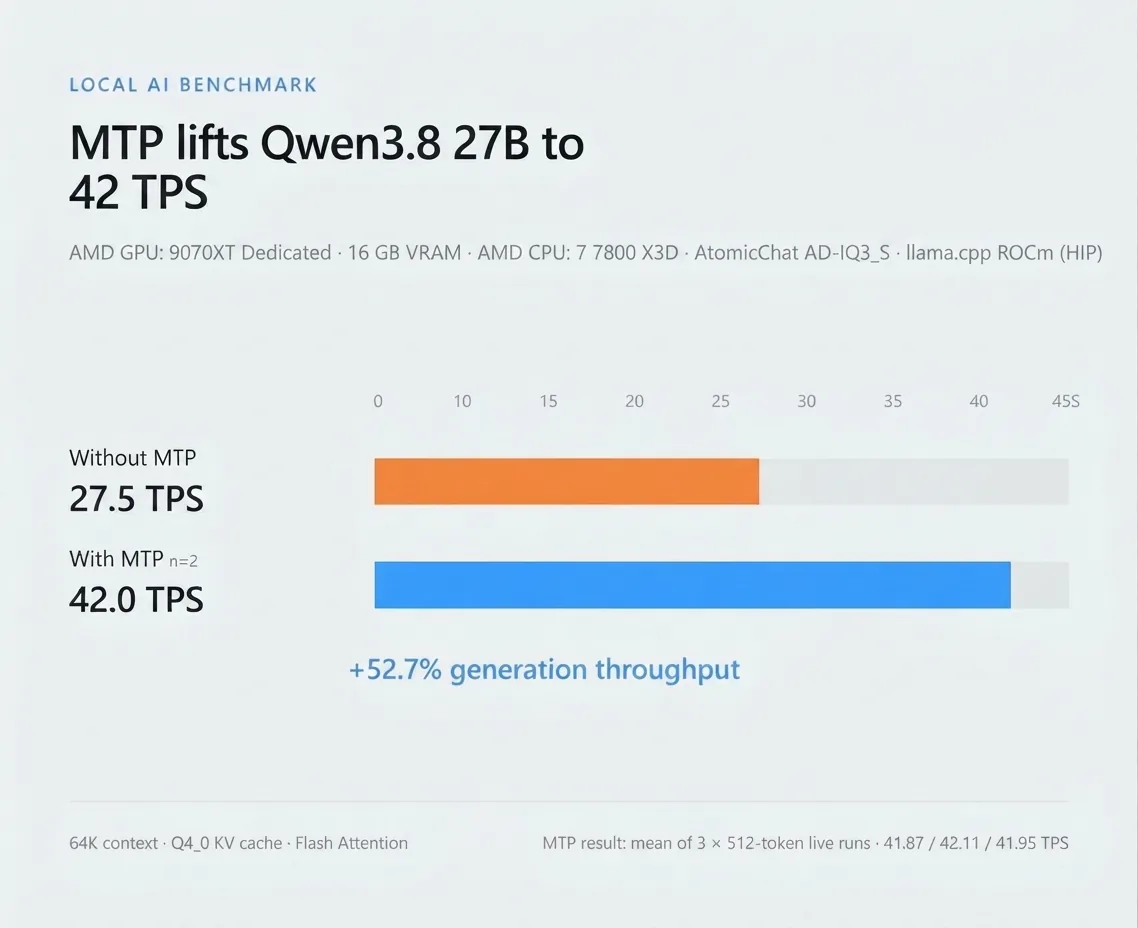 MTP2 vs no MTP — unsloth Q4_K_M (avg 24 vs 17 TPS, 32K q4_0 KV cache)
AtomicChat Qwen3.8-27B-AD-IQ4_XS-IQ3_S.gguf
A mixed-precision dynamic quantization (IQ4_XS with an IQ3_S layer set). The interesting part: it's small enough in practice to give the 64K KV cache real room to breathe.
With MTP2, flash attention, single slot, no memory fitting
llama-server.exe -m D:\source\llms\atomic\Qwen3.8-27B-AD-IQ4_XS-IQ3_S.gguf -ngl 99 --port 1234 -c 64096 --cache-type-k q4_0 --cache-type-v q4_0 -fa on --fit off --parallel 1 --spec-type draft-mtp --spec-draft-n-max 2 --spec-draft-type-k q4_0 --spec-draft-type-v q4_0 --temp 1.0 --top-p 0.95 --top-k 20 --min-p 0.0- Avg throughput: ~42 tokens/sec — the fastest configuration tested
- Quality: good reasoning on the coding task — a step below the other three runs
- KV cache: 64K at q4_0
- CPU usage during eval: up to ~27%
- Context: enough — the full-repo task completed without
/compact - System RAM during eval: ~1 GB
Flash attention, single slot, no memory fitting (no MTP)
llama-server.exe -m D:\source\llms\atomic\Qwen3.8-27B-AD-IQ4_XS-IQ3_S.gguf -ngl 99 --port 1234 -c 64096 --cache-type-k q4_0 --cache-type-v q4_0 -fa on --fit off --parallel 1 --temp 1.0 --top-p 0.95 --top-k 20 --min-p 0.0- Avg throughput: ~27.5 tokens/sec
- Quality: very good reasoning — output nearly identical to unsloth Q4_K_M on this task
- KV cache: 64K at q4_0
- CPU usage during eval: up to ~24%
- Context: enough — full-repo task completed without
/compact - System RAM during eval: ~1 GB
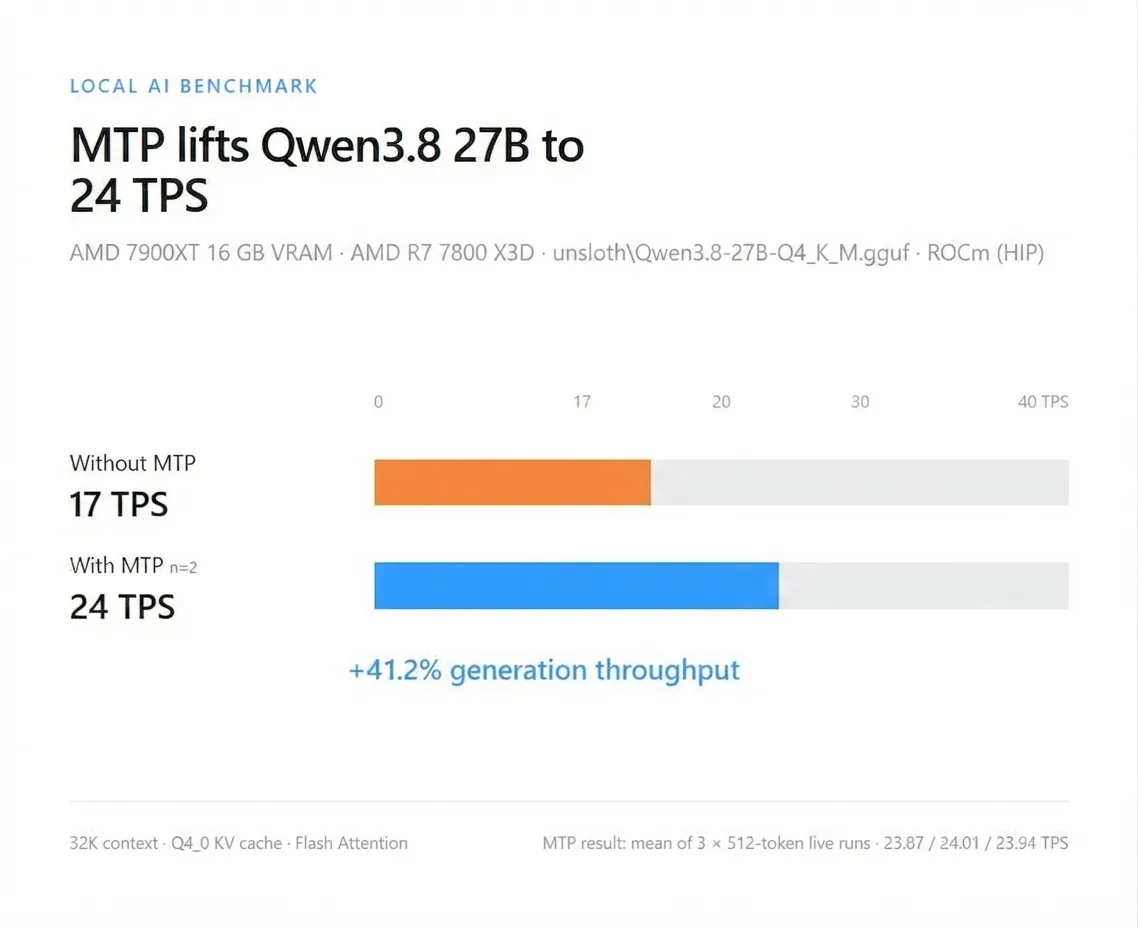 MTP2 vs no MTP — AtomicChat AD-IQ4_XS-IQ3_S (avg 42 vs 27.5 TPS, 64K q4_0 KV cache)
The quantization analysis behind the numbers
The AD-IQ4_XS-IQ3_S file comes from AtomicChat, who also published a quantization analysis with the measurements and instructions behind it. The takeaway for anyone choosing a 4-bit Qwen 3.8 27B quant: there is effectively no quality loss between the three — the margins are small across the board:
- unsloth Qwen3.8-27B-IQ4_XS.gguf — at the top of the group
- lmstudio-community Qwen3.8-27B-Q4_K_M.gguf — still a bit better than AD-IQ4_XS-IQ3_S, by a small margin, but a bit worse than IQ4_XS
- AtomicChat AD-IQ4_XS-IQ3_S — no meaningful loss against the other two on these measurements
That lines up with my own coding-task impressions above: the no-MTP runs on both quantizations produced nearly identical reasoning quality.
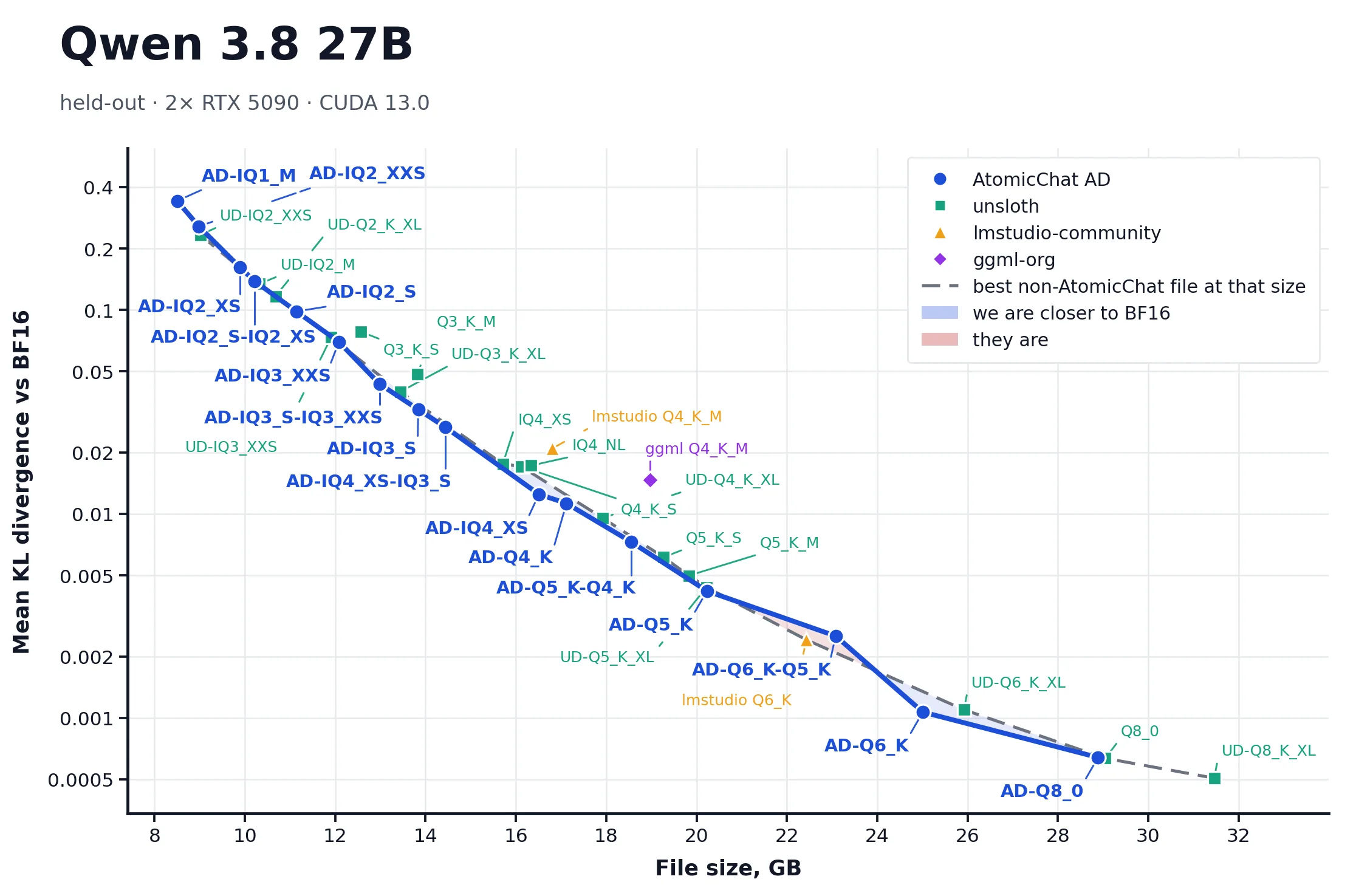 AtomicChat's quantization analysis — measurements comparing the 4-bit Qwen 3.8 27B quantizations (source: AtomicChat)
What stands out
- MTP2 is a real speedup, not a rounding error. It lifted throughput from 17 → 24 TPS (+41%) on the unsloth quant and from 27.5 → 42 TPS (+53%) on the AtomicChat quant. On this hardware, the drafting cost is clearly worth it.
- But MTP shifts load to the CPU. CPU utilization during eval was much higher in the unsloth MTP run (up to ~44%) than in its no-MTP baseline (~25%). The AtomicChat MTP run stayed mild (~27%). Worth knowing if your CPU is also busy.
- The 32K context was the practical ceiling of the unsloth Q4_K_M run on this card — not a property of the model. Q4_K_M is the heaviest quant tested here, and its footprint leaves little VRAM left for the KV cache on 16 GB, so both unsloth configurations ran out on the full-repo task and required
/compactto finish. The 64K AtomicChat configurations completed it cleanly. Don't generalize the 32K ceiling to the whole Qwen 3.8 27B line: with a smaller unsloth quant, the same card could hold a larger KV cache, and the answer may change. - Quality held up better than expected. The no-MTP AtomicChat run produced reasoning nearly identical to unsloth Q4_K_M on this workload, at 27.5 TPS with lower RAM usage. The one soft spot: AtomicChat with MTP2 felt a step weaker on reasoning quality than its own no-MTP run.
- System RAM is mostly mmap. The server's memory-mapped model file alone shows ~13 GB of system DDR5 even when idle, plus ~1 GB (AtomicChat) to ~1.5 GB (unsloth) of working set during eval. Don't panic at the RAM meter — most of that 13 GB is the mapped GGUF, not extra copies of the model.
Takeaways
- Default to AtomicChat AD-IQ4_XS-IQ3_S with MTP2 on a 16 GB card if you want maximum speed: 42 TPS, 64K context that actually fits real coding workloads, and the lowest system RAM of the four runs — accepting a slight quality trade-off under MTP.
- Pick unsloth Q4_K_M (no MTP, or MTP2 if you can spare the CPU) if quality is the priority and you accept a 32K context — that ceiling comes from Q4_K_M's footprint on 16 GB, not the model, so a smaller unsloth quant can fit more context.
- Turn on MTP2 by default and measure your own task: +40–50% tokens per second is a meaningful difference in a coding workflow.
- Leave headroom. Budget for the ~13 GB system-RAM figure from the server's mmap before you stack other workloads next to it.
What's next
On the roadmap: unsloth Qwen3.8-27B-IQ4_XS.gguf (15.7 GB) — a 4-bit dynamic quant that squeezes even closer to the 16 GB ceiling. I flagged it after reading this r/LocalLLM thread on running Qwen 3.8 27B dense fully on a single card. The analysis above puts IQ4_XS at the top of that group anyway — so quality-wise it's the one to beat if it fits. If it does fit, the KV cache gets whatever is left over — so the context math from this post is exactly what matters there.
If you're setting this up from scratch, start with the Qwen 3.8 27B setup guide and come back here for the configuration choices.